December 01, 2025 Manisha Maurya
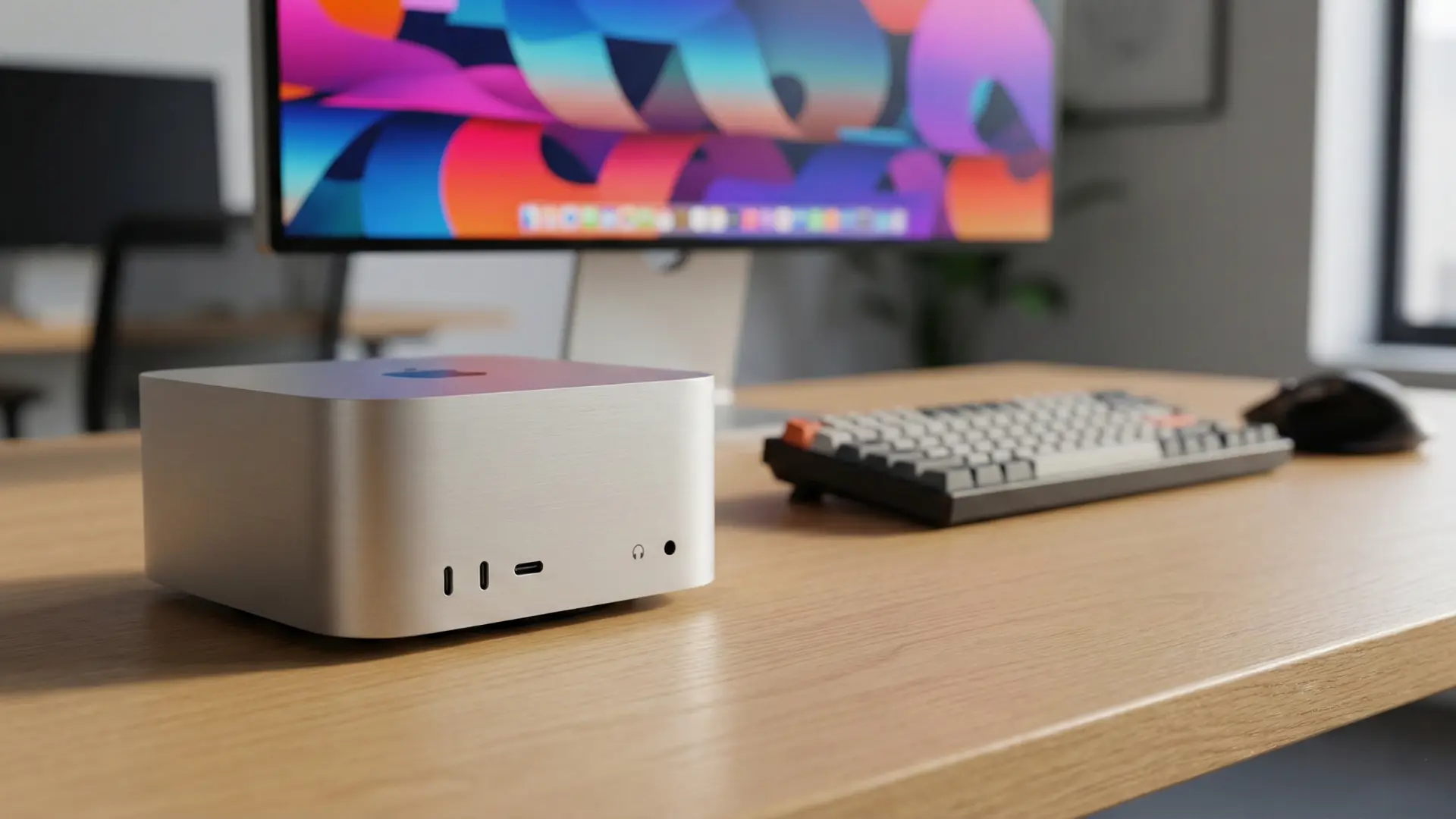
It has been over a decade since Apple significantly redesigned its most affordable computer. That changes now. The 2025 Mac Mini M4 isn't just an internal spec bump; it is a total reimagining of what a desktop computer can be.
Shrinking down to a tiny 5x5-inch footprint while packing the formidable heat of the M4 and M4 Pro chips, Apple has effectively challenged the entire PC industry: Can you go this small and still be this powerful?
The first thing you will notice is the size. Apple has shaved off nearly half the footprint of the previous generation.
Dimensions: 5 x 5 inches (approx. 12.7 cm square).
Aesthetics: It looks less like a computer and more like a premium Apple TV. It retains the signature silver aluminum finish but features a new thermal architecture where air is pulled up through the foot, keeping the system cool despite its dense internals.
The heart of this machine is the silicon. Apple offers two distinct flavors for different users.
Perfect for students, home offices, and standard creative workflows.
CPU/GPU: 10-core CPU and 10-core GPU.
Memory: Starts at 16GB of unified memory (finally ditching the 8GB baseline).
Capability: It handles 4K video editing, complex spreadsheets, and heavy multitasking without breaking a sweat.
For 3D artists, developers, and pro-video editors.
Cores: Up to 14-core CPU and 20-core GPU.
Ray Tracing: Hardware-accelerated ray tracing makes this a viable machine for game developers and 3D rendering.
Throughput: Features massive memory bandwidth (273GB/s) to feed data to the processor instantly.
Here is a side-by-side look at what defines each machine.
| Feature | Mac Mini (M4) | Mac Mini (M4 Pro) |
| Chip | Apple M4 | Apple M4 Pro |
| CPU Cores | 10-core | Up to 14-core |
| GPU Cores | 10-core | Up to 20-core |
| Unified Memory | 16GB, 24GB, or 32GB | 24GB, 48GB, or 64GB |
| Storage | 256GB up to 2TB SSD | 512GB up to 8TB SSD |
| Front Ports | 2x USB-C, Headphone Jack | 2x USB-C, Headphone Jack |
| Back Ports | 3x Thunderbolt 4, HDMI, Ethernet | 3x Thunderbolt 5, HDMI, Ethernet |
| Display Support | Up to 3 displays (Two 6K + One 5K) | Up to 3 displays (Three 6K @ 60Hz) |
| Starting Price | $599 | $1,399 |
One of the biggest user complaints has always been reaching around the back to plug in a thumb drive. Apple listened.
Front I/O: Two USB-C ports and a headphone jack are now easily accessible on the face of the device.
Rear I/O: Three Thunderbolt ports (Thunderbolt 4 for M4; Thunderbolt 5 for M4 Pro), HDMI, and Gigabit Ethernet (upgradeable to 10Gb).
Note on Thunderbolt 5: The M4 Pro model introduces Thunderbolt 5, offering transfer speeds up to 120 Gb/s. This is a game-changer for video editors working directly off external SSDs.
The Student: The starting price of $599 (education pricing is often lower) combined with the 16GB base RAM makes this the best value-for-money computer on the market, period.
The Creative Pro: With the M4 Pro, you get Mac Studio-level performance in a chassis you can toss into a backpack.
The Minimalist: If you hate desk clutter, this machine can easily be mounted under a desk or tucked behind a monitor, becoming virtually invisible.
The Mac Mini M4 is not just a "good update"—it is the new benchmark for compact computing. By standardizing 16GB of RAM and introducing the powerful M4 architecture in a tiny box, Apple has made the Mac Mini the most compelling desktop of 2025.
Whether you are switching from Windows or upgrading from an Intel-based Mac, the M4 Mini offers a price-to-performance ratio that is currently impossible to beat.
Q: Can I upgrade the RAM or storage later?
A: No. Like all Apple Silicon Macs, the unified memory and SSD storage are soldered directly onto the chip. You must configure the machine with the amount of RAM and storage you need at the time of purchase.
Q: Is the base M4 model good enough for 4K video editing?
A: Yes, absolutely. The base model with 16GB of RAM and the M4 chip's media engine can handle multiple streams of 4K video in apps like Final Cut Pro or DaVinci Resolve smoothly. For very complex projects or 8K workflows, consider the M4 Pro.
Q: Can I play games on the Mac Mini M4?
A: Yes, gaming on Mac is getting better. The M4 family features hardware-accelerated ray tracing, which improves lighting and shadows in supported games. While it's not a dedicated gaming PC rig, it can run many modern titles, including those from the Mac App Store and stores like Steam, at respectable settings.
Q: Do I need the M4 Pro model?
A: Most users will be perfectly happy with the standard M4 chip. You should only consider the M4 Pro if your workflow involves intensely demanding tasks like heavy 3D rendering, compiling large codebases, editing 8K video, or if you need to connect more than two high-resolution displays.
Q: What is the advantage of Thunderbolt 5 on the M4 Pro?
A: Thunderbolt 5 offers significantly higher bandwidth (up to 120 Gb/s) compared to Thunderbolt 4 (40 Gb/s). This is primarily beneficial for professionals who use incredibly fast external storage arrays or need to drive multiple ultra-high-resolution displays at high refresh rates.




 Buying guides
 Buying guides
 Buying guides